L.I.F.E : LEGO Integrated Factory Execution
LIFE is a Dockerized microservices-based factory management system built with Spring Boot & React.
It simulates the entire production lifecycle of LEGO products, from customer order intake at the plant warehouse, through module assembly, manufacturing, and final distribution.
The system provides role-based dashboards for different factory operators, real-time inventory tracking, and automated workflow orchestration.
Key Features:
- 🏭 Multi-workstation production coordination
- 📦 Real-time inventory management across warehouses
- 📋 Automated production planning and scheduling
- 👥 Role-based access control for operators
- 🔄 RESTful microservices architecture
- 📊 Admin dashboards for system monitoring
Book a Session or explore a live demo of the application.
🎯 Overview
The LIFE (LEGO Integrated Factory Execution) platform revolutionizes manufacturing operations by leveraging intelligent digital workflows. Designed as a production-ready prototype, it enhances efficiency and productivity through various innovative features.
Key Features
- Real-time Production Control: Manage the entire order lifecycle, from creation to fulfillment, ensuring optimized operations at every stage.
- Role-Based Access Control: With nine different roles, including Admin and Production Control, the system offers granular permissions that cater to specific user responsibilities.
- Live Inventory Tracking: Experience real-time stock monitoring across all workstations, allowing for automatic updates and immediate awareness of inventory levels.
- Dynamic Workstation Assignment: Tasks are allocated based on user roles and workstation capabilities, ensuring efficient resource utilization.
- Responsive Dashboards: User interfaces tailored to specific roles promote operational efficiency with easy access to necessary information.
- Automated Workflows: Intelligent order routing and status transitions enhance the system’s responsiveness to business rules.
- Microservice Architecture: The application employs independently scalable services, ensuring complete data isolation and facilitating maintenance and upgrades.
Benefits of the LIFE Platform
- Operational Efficiency: Minimizes manual paperwork by streamlining production processes, reducing errors and delays.
- Real-Time Visibility: Live dashboards provide instant insights into factory operations, promoting informed decision-making.
- Scalability: The microservice architecture allows for the independent scaling of critical system components to meet varying demands.
- Flexibility: Modular design supports rapid feature development and customization to adapt to changing business needs.
- Reliability: Comprehensive logging, health checks, and error handling contribute to overall system stability.
Current Functionality
- Authentication & Authorization: Utilizes JWT-based authentication for secure user management.
- Product & Inventory Management: Features encompass master data management, real-time inventory tracking, and fulfillment notifications.
- Order Processing: Supports a full customer order lifecycle with status tracking and fulfillment actions.
- Workstation Operations: Role-specific dashboards allow users to manage tasks efficiently while receiving live updates.
- Production Scheduling: Integrates with SimAL for scheduling and automates production control order generation.
- Error Handling & Observability: Provides structured logs, health checks, and standardized error responses for enhanced system monitoring.
This overview highlights the transformative capabilities of the LIFE application within the manufacturing sector. For more detailed insights into architecture, API design, and operational guidance, consult the project’s comprehensive documentation available on GitHub.
The application operates through a systematic approach to managing customer orders, utilizing a series of microservices that facilitate the fulfillment process. The core business logic and the interplay of various roles and services involved in meeting customer demands, are outlined here.
Common Elements
Actors: The Lego Sample Fatory system encompasses several key actors, including customers, the Plant Warehouse (PW), Modules Supermarket (MS), and various production and assembly roles such as Production Planning (PP) and Final Assembly (FA).
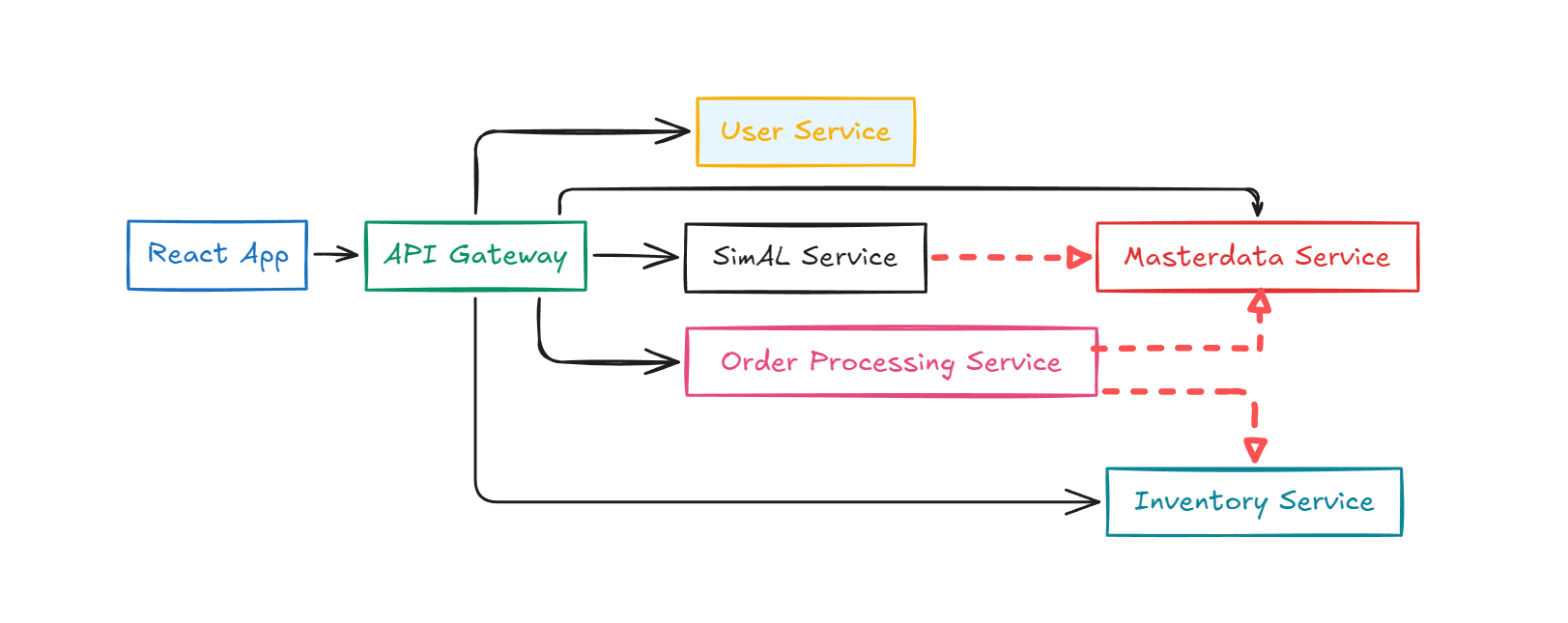
Microservices: The primary microservices that drive operations include:
- Order Processing Service: Orchestrates order handling.
- Inventory Service: Manages stock levels.
- SimAL Integration Service: Mocked integration with the scheduler.
- Master Data Service: Defines item specifications.
Lot-Size Threshold: A critical parameter determining production actions based on order sizes.
Order Fulfillment Scenarios
Scenario 1: Sufficient Stock in Plant Warehouse When a customer places an order, the system checks stock levels. If sufficient products are available, the order is fulfilled immediately. All related processes are handled efficiently, with appropriate status updates.
Scenario 2: Low Stock in Plant Warehouse, Modules Available If the Plant Warehouse lacks enough product variants but the required modules are under the lot-size threshold, the system creates a Warehouse Order to MS for fulfillment.
Scenario 3: Insufficient Modules In situations where the modules are also low, the system triggers a production cycle, generating a Production Order for Manufacturing. This includes a more complex orchestration of orders to fulfill customer requests.
Scenario 4: Large Production Runs If the total missing item quantity exceeds the lot-size threshold, a Production Order is directly issued, bypassing the MS stock check. This signals a larger scale of production to meet customer needs effectively.
Key Takeaways
Understanding these scenarios highlights the intricacies of our application’s order management, from inventory checks to orchestrating production schedules. For detailed operations and underlying architecture, please refer to the comprehensive documentation available on GitHub.
This summary encapsulates the essential operations and business logic, focusing on how the Lego Sample Factory system efficiently manages customer orders while maintaining robust stock control and production planning.
High Level Architecture
Microservice Communication
Data Model Overview
API Authentication Flow
API Gateway & Endpoints
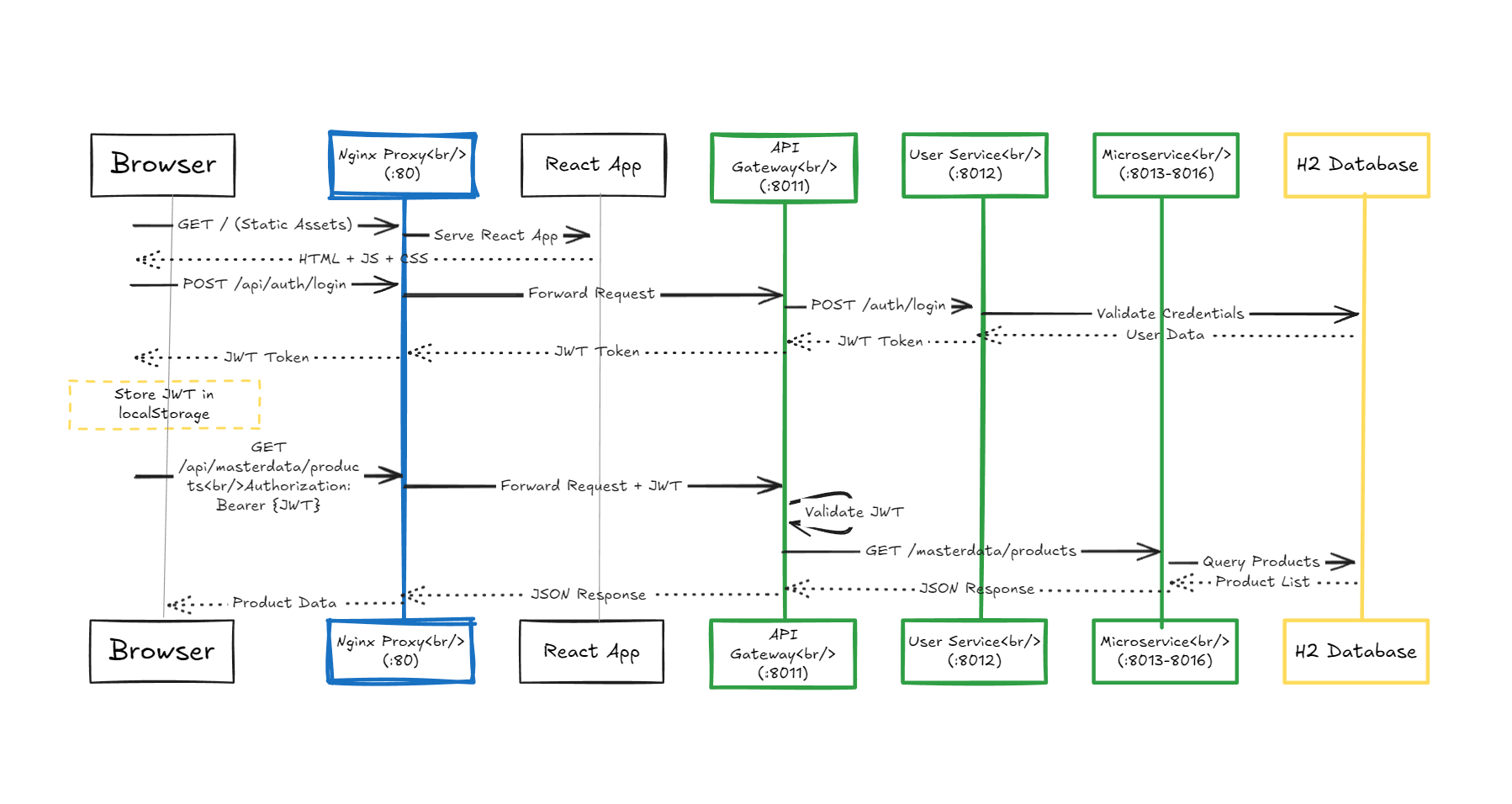
- All client requests flow through the Spring Cloud Gateway on port 8011.
- JWT validation, CORS, and centralized logging are handled at the gateway.
API Base URLs
- Production:
http://localhost/api - Development:
http://localhost:8011/api
Authentication Flow
Core API Endpoints
Authentication (/api/auth)
POST /api/auth/login– User login, returns JWT tokenPOST /api/auth/refresh– Refresh expired token
User Management (/api/users)
GET /api/users– List all users (ADMIN)POST /api/users– Create new user (ADMIN)PUT /api/users/{id}– Update user (ADMIN)DELETE /api/users/{id}– Delete user (ADMIN)GET /api/users/{id}– Get user details (ADMIN)
Master Data (/api/masterdata)
GET /api/masterdata/product-variants– List all productsPOST /api/masterdata/product-variants– Create product (ADMIN)PUT /api/masterdata/product-variants/{id}– Update product (ADMIN)DELETE /api/masterdata/product-variants/{id}– Delete product (ADMIN)GET /api/masterdata/modules– List all modulesGET /api/masterdata/parts– List all partsGET /api/masterdata/workstations– List all workstations
Inventory Management (/api/stock)
GET /api/stock/workstation/{id}– Get workstation inventoryGET /api/stock/alerts– Get low stock alertsPUT /api/stock/{id}– Update stock quantityPOST /api/stock/transfer– Transfer stock between workstations
Order Processing (/api/customer-orders, /api/production-control-orders)
GET /api/customer-orders/workstation/{id}– List orders for workstationPOST /api/customer-orders– Create customer orderPUT /api/customer-orders/{id}/fulfill– Fulfill orderGET /api/production-control-orders– List production ordersPOST /api/production-control-orders/{id}/start– Start productionPOST /api/production-control-orders/{id}/complete– Complete productionPATCH /api/production-control-orders/{id}/notes– Update order notes
Supply Orders (/api/supply-orders)
GET /api/supply-orders/warehouse– List all warehouse orderPOST /api/supply-orders– Create supply orderPUT /api/supply-orders/{id}/fulfill– Fulfill supply orderPUT /api/supply-orders/{id}/reject– Reject supply order
Production Scheduling (/api/simal)
GET /api/simal/schedules– List production schedulesPOST /api/simal/schedules– Create schedulePUT /api/simal/schedules/{id}– Update schedule
Error Handling
All API errors return a standardized JSON structure with timestamp, status, error, message, and path.
For configuration, development, and troubleshooting, see the Development & Operations Guide.
Development & Operations Guide
Quick Start
Prerequisites
- Docker Desktop (Windows)
- Git
- 8GB RAM recommended
- Port 80 available
Installation Steps
- Clone the repository
- Copy
.env.exampleto.envand set your JWT secret - Start with
start-factory.ps1ordocker-compose up --build -d - Access the app at http://localhost
Default Test Accounts
| Username | Password | Role | Access |
|---|---|---|---|
| lego_admin | password | ADMIN | Full system access |
| warehouse_user | password | PLANT_WAREHOUSE | Customer order fulfillment |
| modules_user | password | MODULES_SUPERMARKET | Module warehouse operations |
Shutdown
docker-compose down(stop all)docker-compose down -v(reset databases)
Local Development (Without Docker)
- Backend:
cd lego-factory-backend/<service>; .\mvnw spring-boot:run - Frontend:
cd lego-factory-frontend; npm install; npm run dev(http://localhost:5173) - Update API config in
lego-factory-frontend/src/api/apiConfig.js
Building & Rebuilding
- Backend:
mvnw clean package - Frontend:
npm run build - Docker:
docker-compose build --no-cache <service>
Logs & Health
docker-compose logs -f(all)docker-compose logs -f <service>(specific)- Health:
Invoke-RestMethod http://localhost:8011/actuator/health
Testing API Endpoints
- Use PowerShell/Invoke-RestMethod for login and authenticated requests
Configuration
Environment Variables
- See
.env.examplefor all options (JWT, ports, DB, logging, CORS)
Docker Network
- Internal:
lego-network(services communicate via Docker DNS) - External:
http://localhost:80
Database Access
- Each service: H2 in-memory DB, web console on service port (see table in original README)
Troubleshooting
Common Issues
- Port 80 in use: stop IIS or change port in
.env - Docker not starting: check Docker Desktop, logs, rebuild
- 404 on API: avoid double
/api/apiprefix - JWT expired: re-login or implement refresh
- Data lost: H2 is in-memory by default
- CORS errors: update allowed origins in
.env - Service unhealthy: check health endpoints and logs.